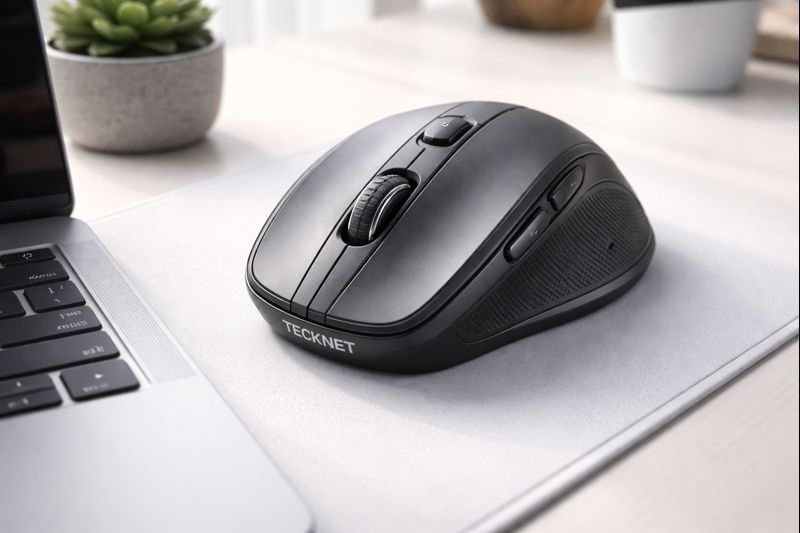

Tecknet Wireless Mouse Review: The Best Budget Multi-Device Mouse? (2026)
Finding a reliable wireless mouse shouldn’t require a loan. While premium brands dominate the conversation with $100+ peripherals, the budget market has quietly been undergoing a revolution. Gone are the days when a “cheap mouse” meant jittery sensors, constant disconnects, and batteries that died in a week.
Enter the TECKNET Wireless Mouse (EWM01308). This isn’t just a basic clicker; it boasts features usually reserved for devices three times its price. With Tri-Mode Connectivity (Bluetooth 5.0, 3.0, and 2.4G), a high-precision 4800 DPI sensor, and a silent click design, it promises to be the ultimate daily driver for students, office workers, and digital nomads.
But can a budget mouse really handle a multi-device workflow without lag? In this Tecknet wireless mouse review, we break down its performance, ergonomics, and battery efficiency to see if it truly deserves a spot on your desk in 2026.
Check Current Price on Amazon📖 Table of Contents
1. Product Overview

The Tecknet Wireless Mouse is designed for versatility. Unlike standard wireless mice that rely solely on a USB dongle, this model enables you to connect to three devices simultaneously. You can have the USB receiver plugged into your desktop PC, connect via Bluetooth 5.0 to your laptop, and Bluetooth 3.0 to your tablet.
It features a classic, ambidextrous-leaning design (though the side buttons favor right-handed users) with a matte finish that resists fingerprints. The standout feature here is the Tru-Wave technology, which ensures precise cursor control over many surface types, potentially eliminating the need for a mousepad.
2. Key Features & Benefits
Ergonomics & Design
The mouse follows a “comfort-first” philosophy. It has a contoured shape that fits snugly in the palm, reducing hand fatigue during long work sessions. The rubberized scroll wheel provides tactile feedback, while the side grips ensure the mouse doesn’t slip during rapid movements.

Silent Click Technology
If you work in a library, a shared office, or late at night at home, the “click-clack” of a standard mouse can be infuriating. Tecknet utilizes silent micro-switches for the left and right buttons. This reduces noise by approximately 90% compared to traditional mice, providing a soft, muted tactile bump without the audible snap.
5-Level Adjustable DPI
Most budget mice lock you into a single speed (usually 1000 DPI). The Tecknet offers five adjustable levels: 800, 1200, 1600, 2400, and 4800 DPI. This allows you to switch from slow, precise pixel-level editing (800 DPI) to fast, dual-screen navigation (4800 DPI) with a single press of the top button.
3. Tri-Mode Connectivity: The Game Changer
The defining feature of this mouse is its ability to multitask. The Easy-Switch button on the bottom allows you to toggle between three connected devices instantly.
- Mode 1 (USB 2.4G): Plug-and-play reliability with the nano receiver. Best for gaming or desktop use where latency matters most.
- Mode 2 (Bluetooth 5.0): Energy-efficient connection for modern laptops and MacBooks.
- Mode 3 (Bluetooth 3.0): Backward compatibility for older devices or tablets.
This feature is essentially a budget-friendly version of Logitech’s Flow technology, making it an incredible value for anyone who juggles a laptop, iPad, and PC at the same desk.
4. Performance: DPI & Silent Clicks
In our analysis, the 4800 DPI sensor is surprisingly capable. While it won’t replace a dedicated esports mouse for competitive shooters, it is more than adequate for strategy games, casual gaming, and high-productivity workflows. The cursor movement is smooth, and the Tru-Wave technology tracks well on wood, plastic, and even fabric surfaces.
Battery life is another strong point. While it requires AA batteries (not rechargeable via cable), the intelligent sleep mode puts the mouse to sleep after inactivity. Tecknet claims up to 30 months of battery life, though heavy users should expect closer to 12-18 months—still impressive longevity.
💡 Pro Tip: Optimize Your DPI
For general office work on a 1080p screen, set the mouse to **1200 or 1600 DPI**. If you use a 4K monitor or multiple screens, bump it up to **2400 or 4800 DPI** to traverse the screen with less wrist movement.5. Technical Specifications
| Feature | Specification |
|---|---|
| Connectivity | Bluetooth 5.0 / 3.0 + 2.4GHz USB |
| DPI Levels | 800 / 1200 / 1600 / 2400 / 4800 |
| Buttons | 6 (Left, Right, Scroll, DPI, Forward, Back) |
| Battery Type | 2x AA Batteries (Not Included) |
| Battery Life | Up to 30 Months (claimed) |
| Sensor | Optical (Tru-Wave Technology) |
| Compatibility | Windows, macOS, ChromeOS, Android, iPadOS |
6. Pros & Cons
- Connects to 3 devices simultaneously.
- Silent clicks are perfect for quiet environments.
- High 4800 DPI is rare at this price point.
- Long battery life with auto-sleep function.
- Works on almost any surface without a pad.
- Side buttons add navigation convenience.
- Not rechargeable; requires AA batteries.
- Side buttons may not work on macOS by default.
- Build material feels lightweight/plasticky compared to premium mice.
- Not suited for competitive FPS gaming.
7. Alternative Options
If the Tecknet doesn’t quite fit your needs, consider these alternatives:
- For Premium Ergonomics: Logitech MX Master 3S. It costs significantly more but offers superior build quality and a magnetic scroll wheel.
- For Vertical Comfort: Anker Vertical Ergonomic Mouse. Great if you suffer from wrist pain, though it lacks Bluetooth multi-device support.
- For Gaming: Razer Basilisk V3. A dedicated wired gaming mouse with much faster response times.
8. Final Verdict
The TECKNET Wireless Mouse redefines what you should expect from a budget peripheral. It punches well above its weight class by offering features typically found in $50+ mice: triple-device connectivity, high-DPI adjustment, and silent operation.
It is the best budget wireless mouse for students, office workers, and anyone who needs a reliable, quiet tool for their daily workflow. While it lacks the premium weight of a Logitech MX Master, it delivers 90% of the functionality for 20% of the price.
Buy the Tecknet Mouse Now9. Frequently Asked Questions
Do the side buttons work on Mac?
By default, the “Back” and “Forward” side buttons are not supported on macOS due to Apple’s system restrictions. However, they work perfectly on Windows, ChromeOS, and Android.
Is this mouse rechargeable?
No, this specific model uses 2 AA batteries. However, the energy efficiency is excellent, offering months of use before needing a swap.
How do I switch between devices?
There is a small circular button on the underside of the mouse. Pressing it cycles through the 2.4G USB mode and the two Bluetooth channels, indicated by different LED lights.
Is it good for gaming?
It is excellent for casual gaming, strategy games, or MMOs thanks to the 4800 DPI. However, for competitive FPS gaming, the latency of a non-gaming wireless mouse might be noticeable.
🚀 Tech Deals Radar
Don’t miss price drops on PC accessories. Join our channel for daily alerts.
🇺🇸 Join USA Deals Channel 🇪🇺 Join Europe Deals Channel
Start Your Own Tech Blog
Review gadgets like this and earn income. Get up to 75% off hosting with our exclusive link.
Claim Hostinger Discount

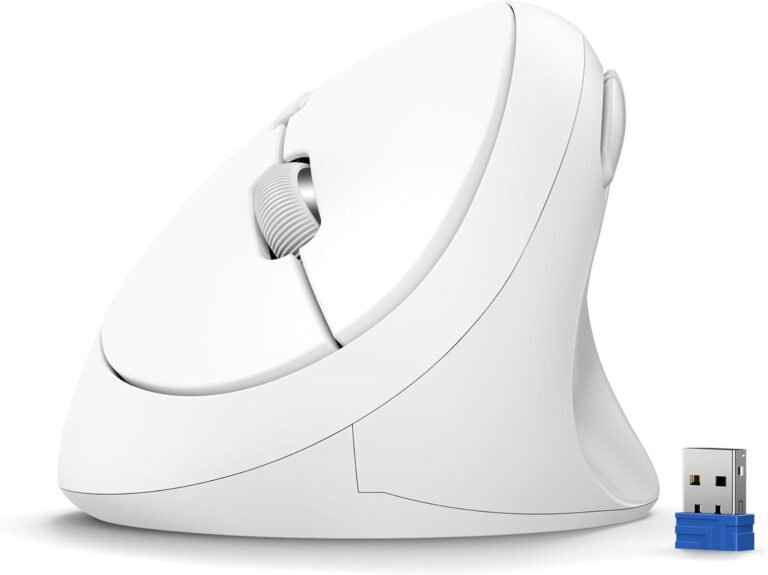
[…] like the Tecknet Wireless Mouse, the INPHIC allows you to pair with three devices simultaneously. You can have the USB dongle in […]