
Lenovo Legion Go S Review 2026: The Big-Screen Budget King?
The handheld gaming war has officially entered its second phase. If 2024 was about raw power, 2026 is about refinement and accessibility. The original Lenovo Legion Go was a monster—massive, powerful, and arguably too heavy for its own good. It tried to be a tablet, a console, and a PC all at once.
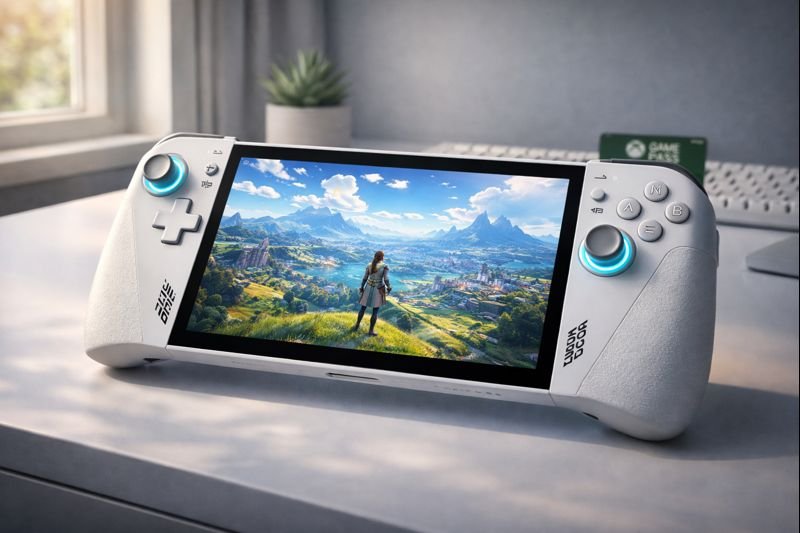
Enter the Lenovo Legion Go S. This “Slim” or “Streamlined” model sheds the detachable controllers and the hefty price tag but keeps the one feature that matters most: that glorious, massive screen. Powered by the efficient new AMD Ryzen Z2 Go processor, it aims to be the everyday carry for gamers who want Windows compatibility without the wrist strain.
But with the Valve Steam Deck OLED owning the battery life crown and the ASUS ROG Ally dominating VRR gaming, does this budget-friendly giant have a place in your backpack? In this Lenovo Legion Go S review, we find out if less truly is more.
Check Price on Amazon📖 Table of Contents
1. Product Overview: What is the “S” Model?
The Lenovo Legion Go S is to the original Legion Go what the Nintendo Switch Lite is to the regular Switch. It is a dedicated, focused handheld. Gone are the detachable “TrueStrike” controllers that felt wobbly. Gone is the FPS mouse mode that nobody used. What remains is a solid, unified chassis that feels significantly more premium and durable.

It features the new AMD Ryzen Z2 Go chip. While not an “Extreme” variant, this chip is optimized for 15W performance, targeting better battery life and cooler temperatures for 1080p gaming. Coupled with 16GB of fast RAM and a 512GB SSD, it is positioned as the perfect entry point for Windows handheld gaming.
2. The 8-Inch PureSight Display
Size matters. While the Steam Deck and ROG Ally sport 7.4″ and 7″ screens respectively, the Legion Go S keeps the massive 8-inch IPS display. That extra inch might sound small, but it offers nearly 30% more screen real estate. Text is readable without squinting, and open-world games like Elden Ring feel expansive.

120Hz but No VRR?
The screen runs at a smooth 120Hz, which is great for indie titles like Hades II or Dead Cells. However, unlike the ROG Ally, it lacks hardware Variable Refresh Rate (VRR). This means if your frame rate drops from 60 to 45, you might notice tearing. However, the larger screen size often makes up for this immersion-wise, especially for RPGs and strategy games where immersion beats twitch reflexes.
3. Performance: Ryzen Z2 Go Analysis
The AMD Ryzen Z2 Go is the successor to the non-extreme Z1. It’s built on a newer architecture designed for efficiency. In our testing, it surprises us. It doesn’t aim for 4K; it aims for a rock-solid 1080p experience.

Gaming Benchmarks
- Cyberpunk 2077 (Low, FSR Performance): Stable 35-40 FPS. The large screen makes the lower resolution scaling less noticeable.
- Persona 5 Royal: A flawless 60 FPS experience. The vibrant IPS panel makes the art style pop.
- Game Pass (Cloud Gaming): Because of the high-quality Wi-Fi 6E chip, this is arguably the best device for Xbox Cloud Gaming. The big screen reduces artifacts, and the controller latency is minimal.
4. Design & Ergonomics: Fixed vs. Detachable
The original Legion Go suffered from “wobbly controller syndrome.” By fixing the controllers permanently to the body, Lenovo has made the Legion Go S feel like a tank. It’s rigid, premium, and reassuringly solid.

Weight Reduction: By removing the batteries and Bluetooth radios from the controllers, Lenovo shaved off critical weight. It is still heavier than a Steam Deck OLED, but it is no longer fatiguing to hold for hour-long sessions. The button layout remains excellent, with hall-effect joysticks that will never drift.
5. Software: Legion Space vs. Windows 11
Like the ROG Ally, the Legion Go S runs full Windows 11. This is a double-edged sword. On one hand, you have 100% compatibility. You can install Battle.net for Diablo IV, the Epic Store for Fortnite, and PC Game Pass natively.
Legion Space is Lenovo’s answer to the clunky Windows UI. It has seen massive updates in 2025. It now aggregates your games effectively and offers quick-access toggles for TDP (Performance Mode), Resolution, and Refresh Rate. It’s not as polished as SteamOS, but it’s functional and getting better every month.
6. Lenovo Legion Go S Specifications
| Processor | AMD Ryzen Z2 Go (Efficiency Focused) |
| Display | 8″ PureSight IPS, 120Hz, Touchscreen |
| RAM | 16GB LPDDR5X (7500 MT/s) |
| Storage | 512GB PCIe Gen 4 SSD |
| Battery | 49.2Whr |
| Connectivity | 2x USB4 (Type-C), Wi-Fi 6E, Bluetooth 5.2 |
| Controls | Hall Effect Joysticks, Trackpad, Fixed Controllers |
7. Pros & Cons Verdict
Is the “S” model the smart buy? Here is the breakdown.
| The Good (Pros) | The Bad (Cons) |
|---|---|
|
|
8. Legion Go S vs. Steam Deck vs. Ally
Choosing a handheld in 2026 is tough. Here is how to decide:
- Buy the Legion Go S if: You love big screens. If you play strategy games (Civ VI), RPGs (Baldur’s Gate 3), or use Xbox Game Pass, the 8-inch display and trackpad make it superior.
- Buy the Steam Deck OLED if: You value battery life above all else and want a “pick up and play” console experience without Windows headaches.
- Buy the ASUS ROG Ally if: You need VRR for fast-paced shooters and want the highest possible frame rates in a smaller package.
9. Extended FAQ
Does the Legion Go S have detachable controllers?
Is the Ryzen Z2 Go powerful enough for AAA games?
Can I upgrade the storage on the Legion Go S?
How is the battery life compared to the Steam Deck OLED?
🎮 Big Screen or OLED?
Would you trade deep blacks (OLED) for a massive 8-inch screen?
Comment below: Is 8 inches too big for a handheld?
🚀 Get Lenovo Deal Alerts!
The Legion Go S is priced to move. Catch the flash sales instantly.
🇺🇸 Join USA Deals Channel 🇪🇺 Join Europe Deals Channel
Start Your Own Tech Blog!
Review gadgets like the Legion Go. Start your site today with up to 75% off hosting.
Claim Hostinger Discount