
Uineer Wireless Mouse Review: The Best Visible Battery Mouse? (2026)
We’ve all experienced it: you are in the middle of an important presentation or a late-night study session, and your wireless mouse suddenly dies. No warning, just a frozen cursor and immediate frustration. For years, the only solution was to carry spare batteries or guess when to charge your device.
The Uineer Wireless Mouse is gaining popularity in 2026 for solving this exact problem with a simple yet brilliant feature: a visible battery power display. Combined with its silent click mechanism and USB-C recharging, it promises to be the ultimate anxiety-free accessory for laptop users.
But beyond the flashy lights, does it perform? In this **Uineer Wireless Mouse review**, we test its ergonomic comfort, tracking precision, and silence levels to see if it is truly the best budget mouse for your daily workflow.
Check Current Price on Amazon📖 Table of Contents
1. Product Overview

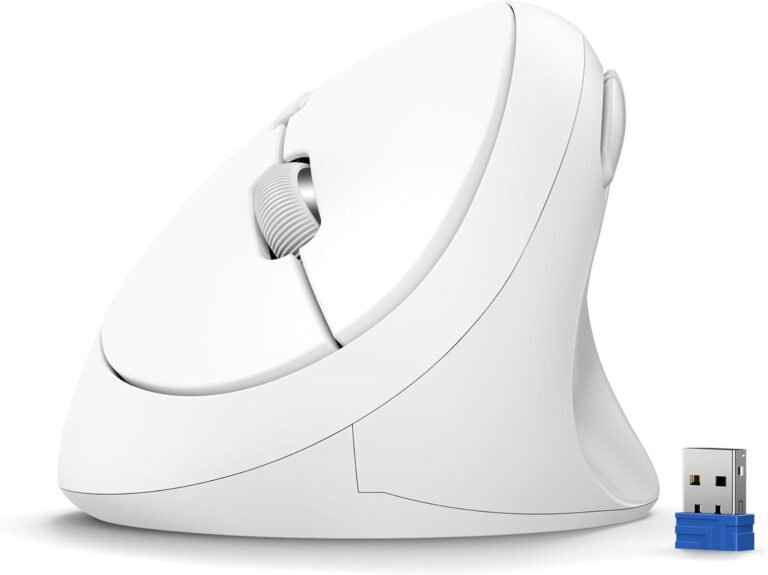
The Uineer Wireless Mouse is a 2.4GHz wireless peripheral designed for simplicity and reliability. Unlike complex Bluetooth mice that can sometimes struggle with connection drops, this mouse relies on a dedicated USB receiver for instant “plug-and-play” performance.
It features a modern, streamlined aesthetic with a matte finish that resists fingerprints. It is compatible with almost any device that has a standard USB port, including Windows laptops, Chromebooks, and older MacBooks (newer Macs may need a USB-C adapter). Its standout quality is the LED display right on the palm rest, giving you real-time feedback on your power levels.
2. Key Features & Benefits
Plug-and-Play Simplicity
While some users prefer Bluetooth, the Uineer sticks to the tried-and-true 2.4GHz wireless connection. This ensures a stable connection up to 10 meters (33ft) away without the lag or pairing issues often associated with budget Bluetooth chips. Simply plug the tiny USB receiver (stored in the bottom of the mouse) into your computer, and it works instantly.

Silent Click Design
If you work in a library, shared office, or dormitory, this feature is essential. The Uineer utilizes silent micro-switches that reduce click noise by over 90%. You still feel the tactile “bump” of the click, but the sharp auditory “snap” is gone. This allows you to work late at night without disturbing roommates or family members.
Ergonomic Comfort
The mouse has a symmetric design, making it usable for both left and right-handed users (though there are no side buttons). The low-profile shape fits easily into a laptop bag, yet the arch provides enough support to prevent hand cramping during extended use.
3. The Star Feature: Visible Battery
This is why you buy this mouse. On the top surface, there is a clear 4-light LED indicator.
- 4 Lights: 100% Charge
- 3 Lights: 75% Charge
- 2 Lights: 50% Charge
- 1 Light: 25% Charge (Time to plug in!)
Most rechargeable mice simply die without warning. The Uineer lets you manage your power proactively. Plus, it charges via a modern USB-C port, so you can use the same cable as your phone or modern laptop. No more hunting for ancient micro-USB cables.
💡 Pro Tip: Power Saving
The mouse automatically enters sleep mode after 10 minutes of inactivity to save power. To wake it up, simply click any button (moving it won’t wake it). This feature extends battery life significantly.4. Performance: Silent Clicks & DPI
For a budget mouse, the tracking performance is excellent. It features an optical sensor with 3 Adjustable DPI levels: 1000, 1200, and 1600. A small button behind the scroll wheel lets you cycle through these speeds on the fly.
- 1000 DPI: Best for precise tasks like photo editing or browsing text-heavy documents.
- 1600 DPI: Ideal for modern high-resolution screens or dual-monitor setups where you need to cover more distance quickly.
The mouse works well on most surfaces, including wood desks, paper, and cloth mousepads. While not a gaming mouse, the 2.4GHz connection is snappy enough for casual games like Minecraft or The Sims.
5. Technical Specifications
| Feature | Specification |
|---|---|
| Connectivity | 2.4GHz Wireless (USB Receiver) |
| DPI Levels | 1000 / 1200 / 1600 |
| Battery | Rechargeable (USB-C Charging) |
| Buttons | 4 (Left, Right, Scroll, DPI) |
| Special Feature | LED Battery Level Indicator |
| Compatibility | Windows, ChromeOS, Linux, Mac (with USB Adapter) |
6. Pros & Cons
- Visible battery indicator prevents unexpected power loss.
- Ultra-silent clicks are perfect for quiet environments.
- USB-C charging is convenient and modern.
- Stable 2.4GHz connection is plug-and-play.
- Lightweight and portable design.
- Very affordable price point.
- Lacks Bluetooth connectivity (requires USB port).
- No side “Back/Forward” buttons for navigation.
- DPI maxes out at 1600 (lower than competitors).
- Not suitable for competitive gaming.
7. Uineer vs. Inphic & Tecknet
How does the Uineer stack up against other popular budget mice?
Uineer vs. Inphic Bluetooth Mouse
The Inphic offers Bluetooth connectivity, making it better for iPads or newer MacBooks without USB-A ports. However, the Uineer’s 2.4GHz connection is often more stable and less prone to interference. Choose Inphic for tablets; choose Uineer for laptops with USB ports.
Uineer vs. Tecknet Wireless Mouse
The Tecknet offers significantly higher DPI (4800) and side buttons, making it better for power users and multitaskers. However, the Tecknet usually requires AA batteries. The Uineer wins on convenience with its built-in rechargeable battery and visible power display.
8. Final Verdict
The Uineer Wireless Mouse is the definition of a “problem solver.” It addresses the two biggest annoyances of wireless mice: the noise and the battery anxiety. By combining silent clicks with a visible LED power display, it offers a stress-free user experience.
It is the best choice for students, library goers, and office workers who want a simple, reliable mouse that just works. If you don’t need Bluetooth or side buttons, this is likely the best value rechargeable mouse you can buy in 2026.
Get the Uineer Mouse Now9. Frequently Asked Questions
Does it work with MacBook?
Yes, it works with any Mac, but since it uses a standard USB-A receiver, you will need a USB-C to USB-A adapter/hub if your MacBook only has USB-C ports.
Can I use the mouse while charging?
Yes, the mouse is fully functional while plugged in via the USB-C cable, effectively turning it into a wired mouse during the charge cycle.
Does it have Bluetooth?
No, this specific model operates solely on a 2.4GHz wireless connection via the included USB dongle. This ensures maximum stability but requires a USB port.
How long does the battery last?
With regular 8-hour daily use, a full charge typically lasts between 3 to 4 weeks. The sleep mode helps extend this duration significantly.
🚀 Tech Deals Radar
Never pay full price again. Join our channel for daily tech discounts.
🇺🇸 Join USA Deals Channel 🇪🇺 Join Europe Deals Channel
Start Your Own Review Site
Review gadgets like this and earn income. Get up to 75% off hosting.
Claim Hostinger Discount