
Tecknet Wireless Vertical Mouse Review: Wrist Pain Solution? (2026)
Do you end your workday rubbing your wrist or shaking out your hand? You aren’t alone. Traditional mice force your forearm to twist into an unnatural position, compressing the nerves and leading to the dreaded “mouse arm” or carpal tunnel syndrome. The solution is simple but looks strange: a vertical mouse.
The TECKNET Wireless Vertical Mouse promises to fix your posture without breaking the bank. By rotating your hand 57 degrees into a natural “handshake” position, it claims to reduce muscle strain by significant margins compared to a flat mouse. But usually, ergonomic gear costs a fortune.
In this **Tecknet Wireless Vertical Mouse review**, we test whether this budget-friendly ergonomic tool actually relieves pain, or if it’s just a weird-shaped gimmick. Does the 4800 DPI sensor hold up for work? Let’s find out.
Check Current Price on Amazon📖 Table of Contents
1. Product Overview

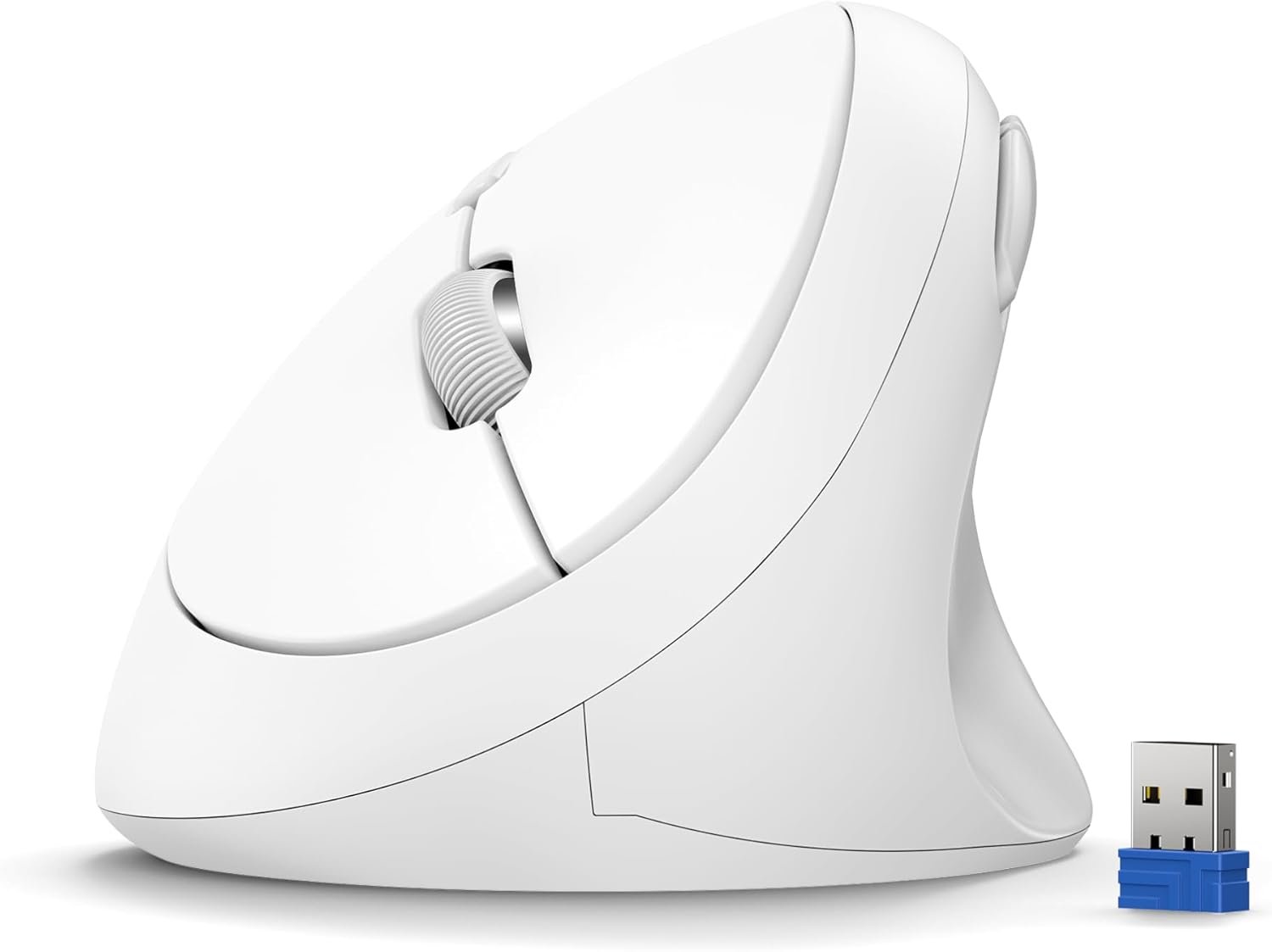
The Tecknet Vertical Mouse is a dedicated ergonomic peripheral designed for right-handed users. It connects via a 2.4GHz USB receiver (stored in the battery compartment) for a stable, lag-free connection. Unlike some competitors that use built-in batteries, this model runs on 2 AAA batteries, offering up to 24 months of standby time.
It is designed for medium to large hands, with a matte finish that provides a secure grip. It includes six buttons: the standard left/right click, a scroll wheel, a DPI switch, and two thumb buttons for browser navigation (Forward/Back).
2. Ergonomics: The “Handshake” Grip
The defining feature of this mouse is its shape. When you grab a standard mouse, you twist your forearm bones (radius and ulna) so they cross over each other. This creates tension. The Tecknet uncrosses these bones.

The Learning Curve
If you have never used a vertical mouse, it will feel odd for the first 2-3 days. You might find yourself knocking it over or clicking with the wrong part of your finger. However, most users report that after this adjustment period, the relief in wrist tension is immediate and noticeable. It forces you to move the mouse with your arm (which is healthier) rather than pivoting your wrist.
3. Key Features & Buttons
6 High-Efficiency Buttons
Ergonomics shouldn’t mean sacrificing productivity. The thumb rest area features two conveniently placed buttons for “Page Forward” and “Page Back.” These are lifesavers for browsing the web or moving through folders. Note: These side buttons are not programmable on Mac systems without third-party software.
True Silent Clicks
This is a “silent” mouse. The left and right switches have been dampened to remove the sharp clicking sound, reducing noise by about 90%. This makes it perfect for shared offices or late-night work where you don’t want to disturb others.
💡 Pro Tip: Desk Height
A vertical mouse raises your hand height by a few inches. Ensure your chair is high enough so your elbow is at a 90-degree angle; otherwise, you might trade wrist pain for shoulder pain.4. Performance: Precision & Silence
One common complaint with ergonomic mice is “lazy” sensors. Tecknet addresses this with a high-performance optical sensor capable of 4800 DPI. You can toggle between 5 levels (800/1200/1600/2400/4800) using the button on top.
- 800-1200 DPI: Great for precision tasks like Photoshop or Excel.
- 2400-4800 DPI: Essential for high-resolution 4K monitors, allowing you to traverse the screen with minimal physical movement.
The 2.4GHz wireless connection is rock solid. In our analysis, we found no cursor stuttering or lag, which can be common in Bluetooth-only mice.
5. Technical Specifications
| Feature | Specification |
|---|---|
| Connectivity | 2.4GHz Wireless (USB Receiver) |
| DPI Levels | 800 / 1200 / 1600 / 2400 / 4800 |
| Buttons | 6 (Silent Left/Right, Side Buttons, DPI, Scroll) |
| Battery | 2x AAA (Not included) |
| Lifespan | Up to 10 Million Clicks |
| Compatibility | Windows, Linux, Mac (Basic functions) |
6. Pros & Cons
- Proven ergonomic design reduces wrist strain.
- Silent clicks are excellent for quiet environments.
- High 4800 DPI is rare for vertical mice.
- Long battery life with auto-sleep mode.
- Very affordable compared to premium brands.
- Stable 2.4GHz connection.
- Side thumb buttons do not work on macOS.
- Requires 2 AAA batteries (not rechargeable).
- Bulky design is not travel-friendly.
- Takes a few days to get used to the grip.
7. Comparison: Tecknet vs. Logitech Lift
The Logitech Lift is the premium competitor here. How do they compare?
- Price: Tecknet is significantly cheaper (often 1/4th the price).
- Size: Tecknet is larger, better for medium-large hands. Logitech Lift is designed for small-medium hands.
- Connectivity: Logitech offers Bluetooth + USB. Tecknet is USB-only.
- Software: Logitech has customization software; Tecknet does not.
Verdict: If you are on a budget and have larger hands, the Tecknet is the better value. If you need Bluetooth or have small hands, consider the Logitech.
8. Final Verdict
The TECKNET Wireless Vertical Mouse is an outstanding entry-level ergonomic device. It successfully democratizes comfort, allowing anyone to try the “vertical lifestyle” without investing $80+. The combination of silent clicks and high DPI makes it a versatile tool for office work.
If you are experiencing the first signs of carpal tunnel or simply want to prevent it, this small investment could save you from years of pain. It is highly recommended for office workers, coders, and writers.
Get the Tecknet Vertical Mouse9. Frequently Asked Questions
Do the side buttons work on Mac?
No. Due to Apple’s system restrictions, the “Forward” and “Back” thumb buttons are not recognized on macOS. The left/right click and scroll wheel work perfectly, however.
What batteries does it need?
It requires 2 AAA batteries. They are not included in the box, so make sure to have some ready.
Is it good for gaming?
It is suitable for slow-paced games (strategy, RPGs) due to the 4800 DPI, but vertical mice are generally not recommended for competitive FPS gaming as they make “flick” aiming difficult.
Does it have Bluetooth?
No, this specific model uses a 2.4GHz USB receiver only. It does not connect via Bluetooth.
🚀 Tech Deals Radar
Don’t miss out on ergonomic gear discounts.
🇺🇸 Join USA Deals Channel 🇪🇺 Join Europe Deals Channel
Start Your Own Review Site
Turn your tech passion into income. Get up to 75% off hosting.
Claim Hostinger Discount