Valve Steam Deck OLED Review 2026: The Handheld King?
Transparency Disclosure: This article contains affiliate links. As an Amazon Associate, Zynuvo earns from qualifying purchases. We prioritize unbiased testing of the best gaming hardware to help you play smarter.
Valve Steam Deck OLED Review 2026: The Ultimate Handheld King?
By Zynuvo | Last Updated: January 2026 | Category: Game Systems
Welcome to our comprehensive **Valve Steam Deck OLED review** for 2026. For years, PC gaming meant being tethered to a desk, surrounded by RGB lights and fan noise. The Nintendo Switch changed the form factor, but it lacked the power for “real” AAA games. Then came the Valve Steam Deck, and everything changed.
Now, in 2026, we have the refined, perfected version: the Valve Steam Deck OLED 1TB. This isn’t just a screen upgrade. It’s a complete internal overhaul that fixes nearly every complaint about the original LCD model. We are talking about 50% better battery life, faster downloads, a lighter chassis, and a screen so beautiful it ruins other displays for you.
But with competitors like the ASUS ROG Ally X and Lenovo Legion Go pushing higher resolutions and Windows compatibility, does this **Valve Steam Deck OLED review** still crown it the king? We put the flagship 1TB model (with the anti-glare etched glass) through its paces to find out.
The Valve Steam Deck OLED represents the “Apple-ification” of PC gaming. It just works. While other handhelds struggle with driver updates, Windows bloatware, and battery drain, the Steam Deck offers a console-like experience right out of the box.
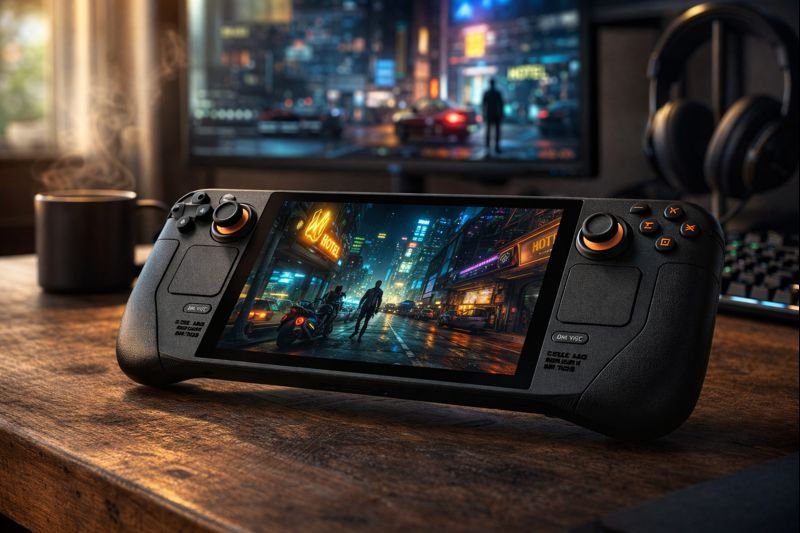
The 1TB model features the exclusive anti-glare etched glass screen and a removable inner case.
The 1TB model we are reviewing is the premium tier. It features a unique premium anti-glare etched glass display, a larger carrying case with a removable liner, and exclusive digital keyboard themes. But the real magic is under the hood: a more efficient 6nm APU, a larger 50Whr battery, and a dedicated fan that runs whisper-quiet.
Unlike the best digital notebooks which focus on productivity, this device is purely about entertainment. It’s designed to let you play Cyberpunk 2077 on a plane, Hades II in bed, and Elden Ring on the couch.
2. Valve Steam Deck OLED Review: The Display
If you’ve read our comparison on the Best OLED TVs of 2026, you know that OLED technology is superior because each pixel is its own light source. This means “infinite contrast”—black is truly black, not washed-out grey.
HDR gaming on a handheld brings shadows and highlights to life in a way LCD screens cannot match.
HDR and 90Hz Refresh Rate
The original Steam Deck had a lackluster LCD screen that covered only 67% of the sRGB color gamut. The new OLED panel covers 110% of DCI-P3. Colors explode off the screen. Playing vibrant games like Hi-Fi Rush or dark, moody games like Dead Space Remake is a transformative experience.
Valve also bumped the refresh rate from 60Hz to 90Hz. While you won’t hit 90fps in demanding AAA games, indie titles feel incredibly fluid. The touchscreen polling rate has also been improved to 180Hz, making typing and touch inputs significantly more responsive.
💡 Pro Tip: The Etched Glass Debate
The 1TB model comes with “Etched Glass.” This diffuses reflections, making it perfect for playing outdoors or under bright lights. However, some purists argue that glossy screens (found on the 512GB model) look slightly sharper in dark rooms. If you mostly play in the dark, the 512GB might actually look “punchier” to you.
3. Performance & Battery Life Analysis
In this part of our **Valve Steam Deck OLED review**, we tackle the biggest question: Is it faster? The Steam Deck OLED is not technically faster than the LCD model in terms of raw compute power. It won’t give you 60fps in games where the LCD got 30fps. However, the experience is smoother due to faster memory (6400 MT/s) and better thermal management.
The Battery Miracle
The battery life is the real headline. Valve shrunk the processor from 7nm to 6nm (making it more efficient) and physically enlarged the battery from 40Whr to 50Whr.
AAA Gaming (Cyberpunk 2077): ~2.5 hours (up from 1.5 hours on LCD).
Indie Gaming (Stardew Valley): ~10-12 hours (up from 6-7 hours).
Streaming (Netflix/YouTube): ~14 hours.
If you plan on long travel sessions, we still recommend pairing this with one of the best portable power stations or a solid power bank, but for daily commutes, the charger can finally stay at home.
4. Software Experience: SteamOS vs. Windows
This is where the Steam Deck wins against the ASUS ROG Ally and Lenovo Legion Go. SteamOS is a custom version of Linux designed specifically for a controller. You press the power button, and you are in your library in seconds.
Console-Like Sleep Mode: You can press the power button mid-game to suspend the device, then wake it up 3 days later and resume instantly. Windows handhelds struggle with this, often crashing games or draining battery in sleep mode.
The “Verified” Program
Valve tests games and marks them as “Deck Verified” (Green Check) or “Playable” (Yellow i). In 2026, the library of verified games is massive, covering nearly every major release. While you can install Windows on the Steam Deck to play Game Pass or Fortnite, SteamOS is so good that most users never bother.
5. Ergonomics, Audio, and Build Quality
The Steam Deck is large—much larger than a Nintendo Switch—but it is incredibly comfortable. The grips are contoured to fit adult hands, and the button placement keeps your thumbs in a natural position.
The trackpads allow you to play mouse-and-keyboard strategy games that are impossible on other handhelds.
Audio Quality: The speakers on the OLED model are louder and have more bass than the original. However, for total immersion in noisy environments (like planes), you should pair it with high-end audio gear. Check out our review of the best noise-canceling headphones to find the perfect companion.
Haptics & Controls: The thumbsticks on the OLED model have a redesigned texture for better grip, and the haptic feedback is tighter and more precise. The 1TB model also features orange accents on the power button, distinguishing it as the premium model.
6. Valve Steam Deck OLED 1TB Specifications
Processor (APU)
6nm AMD APU (Zen 2 CPU + RDNA 2 GPU)
RAM
16GB LPDDR5 @ 6400 MT/s
Storage
1TB NVMe SSD
Display
7.4″ HDR OLED (1280 x 800), 90Hz, 1000 nits peak
Battery
50Whr (3-12 hours gameplay)
Connectivity
Wi-Fi 6E, Bluetooth 5.3
Weight
~640 grams (approx. 5% lighter than LCD)
Charging
45W USB-C PD 3.0
7. Pros & Cons Verdict
To conclude this **Valve Steam Deck OLED review**, here are the key takeaways.
The Good (Pros)
The Bad (Cons)
Display: The HDR OLED screen is best-in-class.
Battery: Massive improvement over the original.
OS: SteamOS offers a frictionless console experience.
Trackpads: Essential for mouse-based games.
Wi-Fi 6E: Downloads games up to 3x faster.
Size: It is bulky and takes up a lot of bag space.
Performance: Struggles with the newest AAA games at high settings.
Anti-Cheat: Some games (Destiny 2, Fortnite) don’t work on SteamOS.
8. Buyer’s Guide: 512GB vs. 1TB?
Valve sells the OLED model in two main capacities: 512GB and 1TB. Which one should you buy?
Buy the 512GB Model If:
You mostly play indoors (Glossy screen looks sharper in dark rooms).
You are comfortable opening the device to upgrade the SSD yourself later.
You want to save ~$100.
Buy the 1TB Model If:
You play outdoors or in bright offices (Etched glass kills glare).
You want the largest stock storage for massive games (e.g., Call of Duty is 200GB+).
You want the exclusive virtual keyboard themes and the removable liner case.
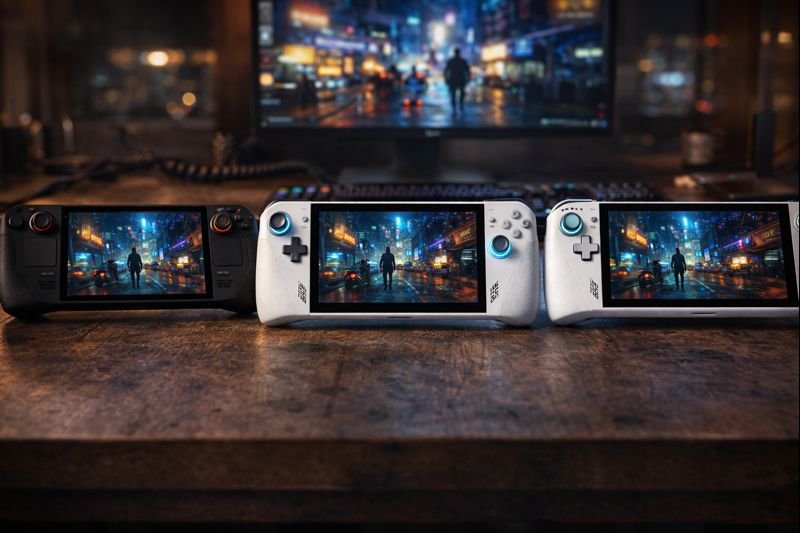
9. How It Compares: Deck vs. Ally X vs. Legion Go
The handheld market in 2026 is competitive. Here is a quick snapshot of how the Deck stacks up.
ASUS ROG Ally X: Runs Windows 11, has a VRR screen (smoother motion), and slightly more raw power. Better for Game Pass users, but worse battery life and clunky software.
Lenovo Legion Go: Features detachable controllers and a massive 8.8″ screen. It’s heavier and less portable, acting more like a tablet with controllers.
Steam Deck OLED: The most balanced device. Best battery life, best screen contrast (OLED beats LCD), and easiest user interface.
10. Extended FAQ
Can I use the Steam Deck as a regular PC?
Yes. You can switch to “Desktop Mode” which gives you a full Linux KDE Plasma desktop. You can browse the web, watch movies, install non-Steam apps, and even do work. Connecting a dock, monitor, mouse, and keyboard turns it into a capable workstation.
Does the etched glass on the 1TB model reduce sharpness?
Technically, yes, but minimally. The etching process diffuses light to reduce glare, which can make text look slightly “softer” compared to the glossy 512GB screen. However, in real-world gaming, the lack of reflections usually results in a better perceived image for the 1TB model.
Can I play Fortnite or Call of Duty on Steam Deck?
Not natively on SteamOS due to anti-cheat incompatibilities. To play these games, you either need to stream them via Xbox Cloud Gaming / GeForce Now, or install Windows on your Steam Deck (dual-boot).
Is the 1TB Steam Deck OLED worth the extra cost?
For most users, yes. The combination of double the storage (modern games are huge), the premium anti-glare screen, and the upgraded carrying case offers significant value. Upgrading the SSD manually is possible but risky for beginners.
🎮 Handheld Gaming Revolution
Are you team SteamOS (Console Simplicity) or team Windows Handheld (Maximum Compatibility)?
Comment below: Which game would you play first on the Deck?
🚀 Get Handheld Gaming Deal Alerts!
Steam Decks and accessories go on sale rarely. We track the drops instantly.










[…] Read our full deep dive here: Valve Steam Deck OLED 1TB Review (2026) […]